Updating the Firmware on a Canon EOS 5D III
When you purchase through links on our site, we may earn an affiliate commission at no additional cost to you. If you want to find out how this works: [Read More Here]
Updating the Firmware on a Canon EOS 5D III to Version 1.3.6
I recently acquired a Canon EOS 5D III which is an awesome camera even in today’s mirrorless environment. I was actually looking for the 5D II but came across the mark III not only in pristine condition but with an activation count of less than 13,000. This on a camera that regularly goes up to 750,000+ before failure!
Where to Find the Firmware Update
Anyway, I went looking for the latest firmware (the camera showed 1.1.3 and a search showed the latest being 1.3.6) and ended up following a Google link simply because all I got initially searching Canon’s site was what were basically “buy our stuff” responses and not what I was looking for.
The link for those interested is here: Canon EOS 5D III Firmware.
And this is the correct page for both Windows (in my particular case) and Mac OSX.
Checking the Installation Instructions for the Firmware Update
Now because it has been a long time since I last updated a Canon camera I clicked on the “Details” link which opened up an “Installation Instructions” link. Which, when clicked on, opened up a small window which did… absolutely nothing.
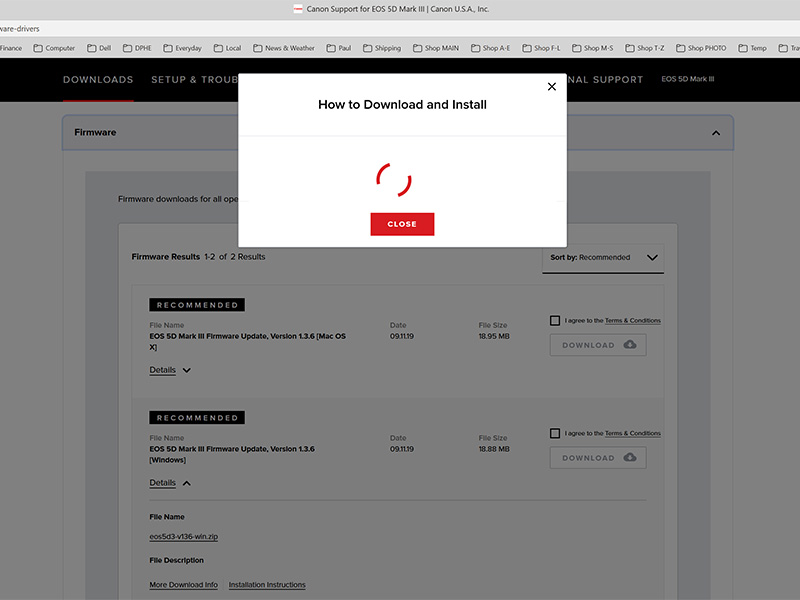
I did wonder if it was my browser as I use Edge Canary – a test version – as standard, but it wasn’t. It still didn’t load anything using Edge Official, Brave, or Firefox. It just sat there going round and round.
Now once you agree and check the T&C box you can download the firmware update and you then get given a “Next: How to locate and install your download” link which just tells you where to find the file on your computer not how to install it.
Downloading the Firmware Update Anyway!
I downloaded the file which is zipped and called ” eos5d3-v136-win” despite the lack of guidance and unzipped it. The unzipped file you will need is called “5D300136.FIR.”
Now to be fair there are instructions included with the unzipped folder that include English, French, Japanese, Spanish, and Chinese, but I still maintain that it would have been helpful to have those instructions prior to downloading!
How to Install a Firmware Update for the Canon EOS 5D III
You will need a CF memory card reader and, of course, a CF memory card.
Once you have downloaded and unzipped the file you need to:
- Copy the extracted .FIR file to the root directory of a CF memory card by inserting the card into a card reader and dragging/dropping/copying the file to the card. If you’re not sure what is meant by the card’s root directory it is its top-level or main directory and is the first screen seen immediately upon opening the card on a computer.
- Install the CF card into your camera and call up Firmware Ver. x.x.x. in your camera’s 3rd set-up menu which is the one with the yellow wrench.
- Select OK when asked if you want to upgrade to the new version.
Then all you have to do is wait! It doesn’t take long – just a few minutes – but I do recommend using a fully charged battery just in case it takes longer.


You May Also Like
OM System Prices Going Up!

Zhiyun Molus G300 LED Light Review